Book Detail
The book detail page is where all actions for a single book come together.
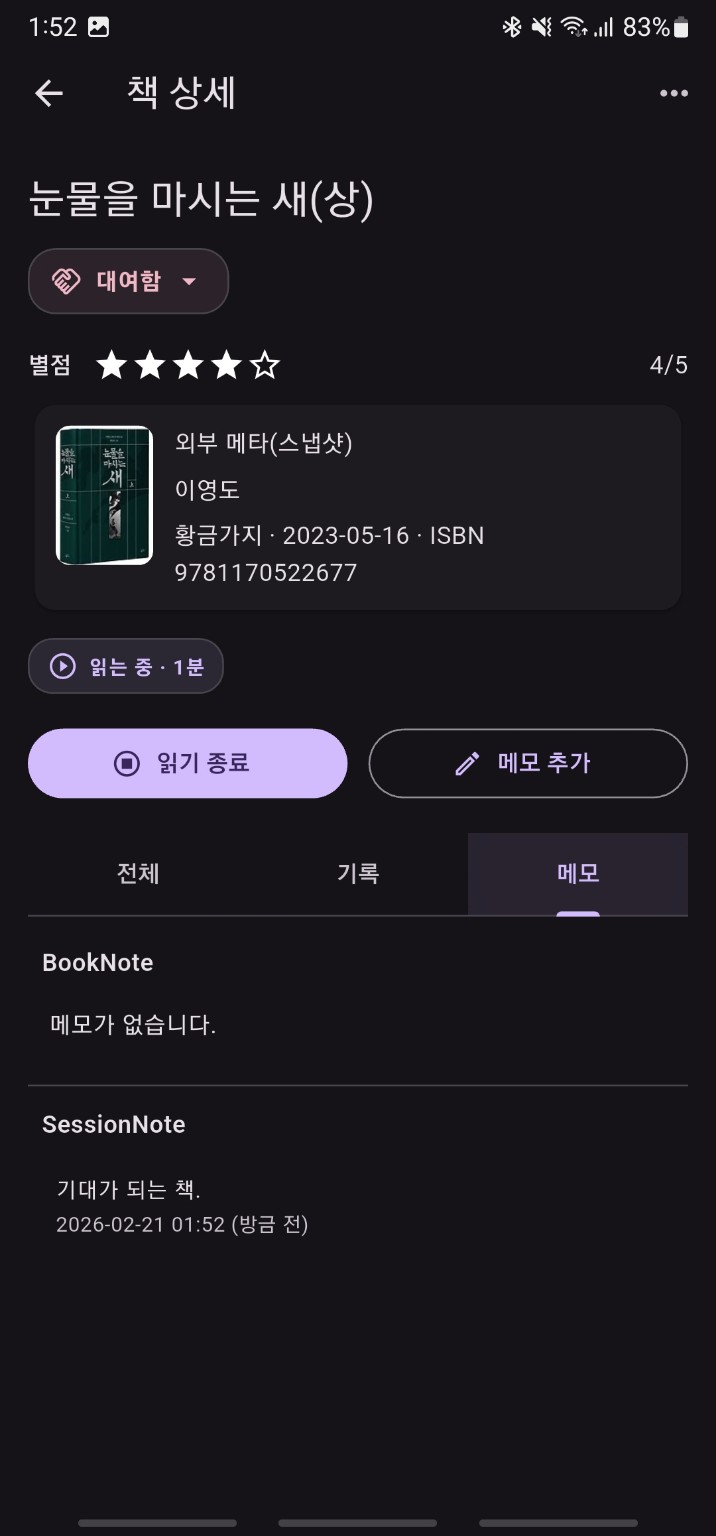
What you can do at the top
- review the title
- change book status
- save or clear a rating
- see whether the book is hidden
Book status can be changed directly by tapping the status chip.
More menu
The top-right menu can include these actions:
Mark CompletedMark AbandonedRemove from LibraryRestore to Library
After completion or abandonment, the app can suggest creating a book note.
Reading controls
If the book is not hidden, the page shows reading-related controls such as:
- start a session
- end a session
- enter progress
- see whether the book is actively being read
The result depends on the progress entered when ending a session.
100%: the book is completed- less than
100%: the session ends and a session note flow can follow
Tabs
The lower section of the page has three tabs:
All: all activity related to this bookRecords: reading records and sessionsNotes: book notes and session notes
Viewing and editing notes
From the notes tab, existing notes can be opened in a detail sheet. In the current implementation, notes can be edited as well as viewed.
Hidden book behavior
For hidden books, reading controls are disabled and the page focuses on hidden-state information and restore actions.